Public preview: This API is in public preview. Endpoints, schemas, and limits may change before general availability.
Tools
Built-in tools, how they run for API callers, and how tool calls and generated files show up in the stream.
EU GPT ships with a fixed set of server-side tools. The model decides when to use them; the platform runs them; the results are folded back into the answer.
You do not register tools per request. You do not pass tool schemas. The tool catalogue is the catalogue.
The built-in tools#
| Tool | What it does | Typical use |
|---|---|---|
web_search | Searches the web and returns up to five results, each with a title, URL, and snippet. | “What’s the latest on …”, “Find news about …”. |
web_fetch | Fetches a URL and extracts the readable text. | “Read this article and summarise it.” |
calculator | Safe math expression evaluation. Never hallucinates arithmetic. | Anything involving numbers — totals, percentages, conversions. |
current_datetime | Returns the current date and time, optionally in a given time zone. | “What day is it?”, relative time references. |
describe_image | Lets a vision model look at an image you attached. Only available when the request includes images. | “What does this chart show?” |
generate_pdf | Creates a PDF document. | “Write this up as a PDF report.” |
generate_docx | Creates a Word document. | “Turn this into a Word document.” |
generate_pptx_javascript | Creates a PowerPoint presentation. | “Make five slides about our results.” |
The names in the first column are the name you see on tool calls in the stream.
Tools run without an approval step#
For API calls, tools run as soon as the model asks for them. Your application does not have to approve or execute anything, and there is no round trip through your code.
A few limits keep tool use bounded:
- At most 10 web searches and page fetches per request.
- Fetched pages are cut to about 15,000 characters of readable text.
- When the model has used its tool rounds, it answers with what it has.
Switching tools off#
There is no per-request switch for individual tools, but you have three levers:
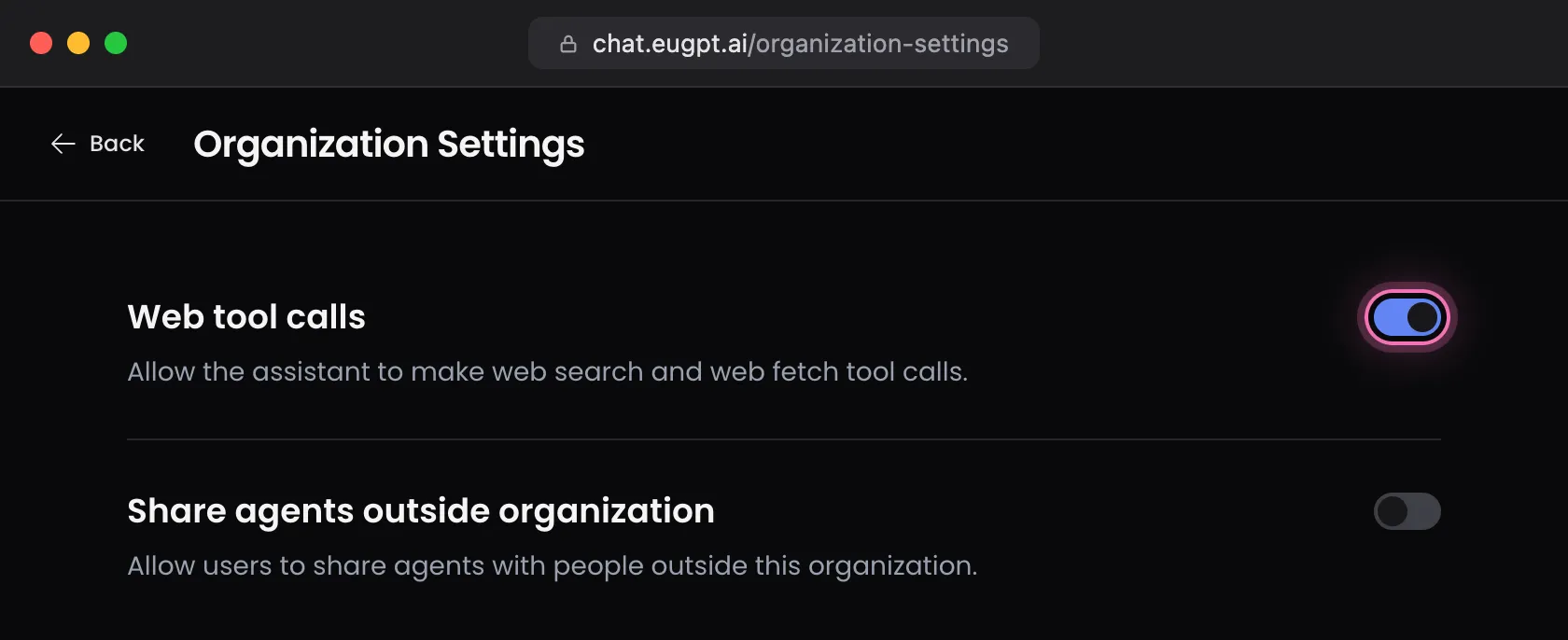
- Organisation setting. An organisation admin can switch off Web tool calls in the web app (the menu under your name → Organization). Then
web_searchandweb_fetchare not used, in the web app or through the API. - Structured output. A request with
response_formatruns without any tools. See Structured outputs. - Instructions. Ask in
instructions, for example “Answer from your own knowledge only. Do not search the web.” The model usually complies.
How tool calls appear in the stream#
Tools run on the server, but their execution is visible in the streamed events so your UI can show what is happening.
The event sequence for a web-search-then-answer turn looks like:
response.created
response.output_item.added       (the assistant message, output_index 0)
response.content_part.added
response.output_item.added       (function_call, name "web_search", status "in_progress")
response.output_item.done        (function_call, status "completed", output = the search results)
response.output_text.delta       (the answer, possibly citing the results)
response.output_text.delta       …
response.output_text.done
response.completed
The output_item.added / output_item.done pair carries the tool call:
{
  "type": "response.output_item.done",
  "sequence_number": 5,
  "output_index": 1,
  "item": {
    "id": "fc_call_8a1f2c3d",
    "type": "function_call",
    "status": "completed",
    "name": "web_search",
    "call_id": "call_8a1f2c3d",
    "arguments": "{\"query\":\"GDPR penalties 2026\"}",
    "output": "Found 5 results for \"GDPR penalties 2026\": …"
  }
}
The output is plain text written for the model, not a structured format, so show it or summarise it, but do not parse it. If you are rendering a chat UI, show a “searching the web…” indicator on output_item.added for a function call, and mark it done on output_item.done. Match the two by call_id.
Tool errors#
If a tool fails (the fetched page returns an error, the calculator gets gibberish), the model sees the error in the tool’s output and usually handles it — it retries with a different argument or answers without the tool. When a tool could not run at all, output_item.done has status: "failed". You may want to surface “search failed, answering from what the model knows” hints to your users.
Sequential and parallel tool calls#
The model can call several tools in one turn, and calls in the same round run concurrently. You will then see several output_item.added events before their output_item.done events. Correlate them by call_id, not by output_index.
Generated files#
When the model creates a PDF, Word, or PowerPoint file, the stream contains a response.file.generated event near the end:
{
  "type": "response.file.generated",
  "sequence_number": 41,
  "file": {
    "call_id": "call_4be9d1a7",
    "tool_name": "generate_pdf",
    "key": "8f14e45f-ceea-467a-a4ed-a9e9a5cb16ee/q3-report.pdf",
    "filename": "q3-report.pdf",
    "size": 48213,
    "content_type": "application/pdf"
  }
}
A non-streaming response lists the same objects in generated_files. To download a file, ask for a short-lived link with its key:
curl https://api.eugpt.ai/v1/files/generated/8f14e45f-ceea-467a-a4ed-a9e9a5cb16ee/q3-report.pdf \
  -H "Authorization: Bearer $EUGPT_API_KEY"
# {"url": "https://…", "filename": "q3-report.pdf"}
The url is valid for 60 seconds; download the file right away and request a new link when you need it again. See the Files API reference.
Custom tools#
Custom tools (your own functions) are not part of the public API today. A tools parameter in the request is ignored. Agents in the web app combine their own files and instructions with the built-in tools; a way to bring your own functions is planned.