Public preview: This API is in public preview. Endpoints, schemas, and limits may change before general availability.
Conversations
Stateful threads vs stateless requests — when to use which.
A conversation is a server-side thread of messages. EU GPT stores the history so later requests can build on earlier turns without you re-sending everything.
There are two ways to call the API.
Stateless requests#
Omit conversation_id. Each call is independent: the only context the model sees is the input you send plus any instructions.
{
  "model": "auto",
  "input": "Summarise this in one sentence: …",
  "stream": false
}
Use stateless when:
- The request is one-shot and short — classification, extraction, translation, summarisation of a single chunk.
- You keep track of context yourself and put what the model needs into
inputorinstructions. - You do not want the request to appear in the user’s chat history.
A stateless request still creates a conversation, so the answer can be stored, but that conversation is hidden from the user’s chat history. Set "visible": true to show it in the web app’s sidebar instead, for example to read it back or to continue it there.
The API does not return the id of that conversation. To continue a conversation through the API, use the id of a conversation from the web app.
Stateful conversations#
Pass the conversation_id of an existing conversation. EU GPT adds the conversation’s earlier messages as context.
{
  "model": "auto",
  "input": "And add a bulleted list of risks.",
  "conversation_id": "8f14e45f-ceea-467a-a4ed-a9e9a5cb16ee",
  "stream": true
}
Use stateful when:
- The conversation has several turns and you want EU GPT to keep the history.
- You want the turns to appear in the web app, after the conversation’s earlier messages.
- The conversation gets long: EU GPT summarises older turns for you.
Finding a conversation id#
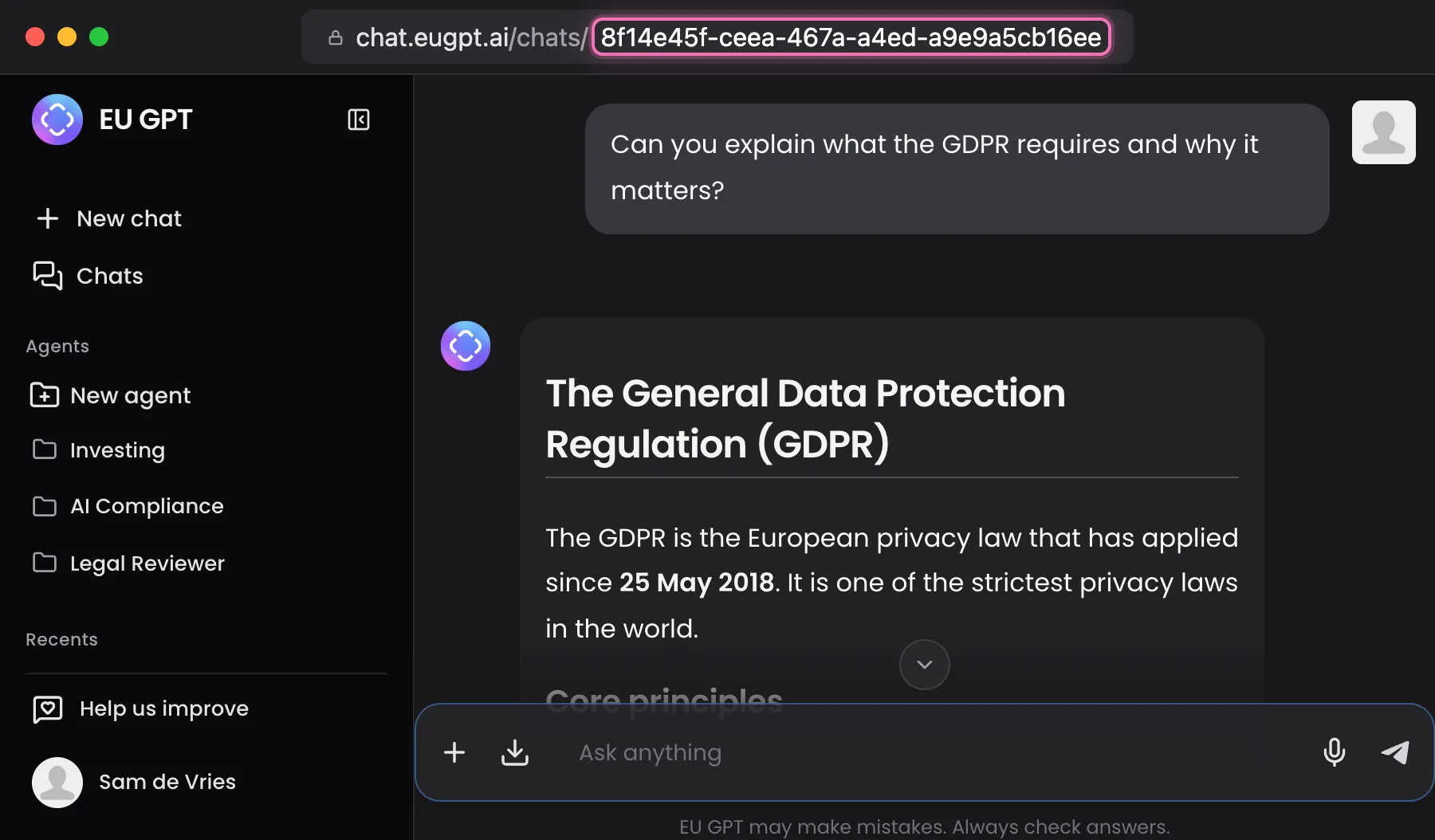
Open the conversation in the web app. Its id is the last part of the address: chat.eugpt.ai/chats/<conversation id>. For a conversation inside an agent, the address is chat.eugpt.ai/projects/<agent id>/chats/<conversation id>.
Lifecycle#
- A conversation is created in the web app when a user starts a new chat, or by an API request without
conversation_id. - You add to a conversation by sending its
conversation_id. Sending aconversation_iddoes not change whether the conversation is visible. - Conversations belong to the user who created them. An API key can only use conversations of the user who created the key.
Context windows and summarisation#
Each chat model has a fixed context window. EU GPT manages this for you:
- The most recent messages (currently the last eight) are passed verbatim.
- Older messages are summarised, and the summary is passed along instead.
- The summary is updated as the conversation grows.
You do not need to truncate or summarise on your side. Just keep sending the same conversation_id.
Agents (projects) and RAG#
In the web app, an agent groups conversations with a set of files and its own instructions. The API calls it a project. Pass its id as project_id, and EU GPT searches the agent’s files for passages relevant to the question and grounds the answer in them. In a streamed response, the final response.completed event lists those passages as sources.
{
  "model": "auto",
  "input": "What does the 2024 audit say about Q3 server costs?",
  "project_id": "1c8b9a7f-2d3e-4f5a-9b8c-7d6e5f4a3b2c",
  "stream": true
}- You find the id in the address bar when the agent is open:
chat.eugpt.ai/projects/<agent id>. - You must be a member of the agent; otherwise the request returns
403. - The agent’s own instructions apply, unless you send
instructions. project_idapplies to requests withoutconversation_id. A conversation keeps the agent it was created in, so with aconversation_idyou do not need to repeat it.